
Deprecated: Methods with the same name as their class will not be constructors in a future version of PHP; mwm_aalLoader has a deprecated constructor in /home/cctest/domains/chillcreations.cctestweb.com/public_html/wp-content/plugins/better-anchor-links/auto-anchor-list.php on line 30

Deprecated: Methods with the same name as their class will not be constructors in a future version of PHP; mwm_aal has a deprecated constructor in /home/cctest/domains/chillcreations.cctestweb.com/public_html/wp-content/plugins/better-anchor-links/mwm-aal-class.php on line 14

Notice: Function add_shortcode was called incorrectly. Invalid shortcode name: . Do not use spaces or reserved characters: & / [ ] = Please see Debugging in WordPress for more information. (This message was added in version 4.4.0.) in /home/cctest/domains/chillcreations.cctestweb.com/public_html/wp-includes/functions.php on line 6031

Notice: Trying to access array offset on value of type int in /home/cctest/domains/chillcreations.cctestweb.com/public_html/wp-content/themes/yoo_capture_wp/warp/src/Warp/Config/Repository.php on line 243

Notice: Trying to access array offset on value of type int in /home/cctest/domains/chillcreations.cctestweb.com/public_html/wp-content/themes/yoo_capture_wp/warp/src/Warp/Config/Repository.php on line 243

Notice: Trying to access array offset on value of type int in /home/cctest/domains/chillcreations.cctestweb.com/public_html/wp-content/themes/yoo_capture_wp/warp/src/Warp/Config/Repository.php on line 243

Notice: Trying to access array offset on value of type int in /home/cctest/domains/chillcreations.cctestweb.com/public_html/wp-content/themes/yoo_capture_wp/warp/src/Warp/Config/Repository.php on line 243
Configuring ccInvoices » Chill Creations
Deprecated: Function WC_Cart::get_checkout_url is deprecated since version 2.5! Use wc_get_checkout_url instead. in /home/cctest/domains/chillcreations.cctestweb.com/public_html/wp-includes/functions.php on line 6031

logo

Configuring ccInvoices

In ccInvoices you will be able to (among other things) configure date format and invoice number format. An explanation about these configuration options can be found in the configuration itself.

  1. Go to the administrator of the Joomla! website
  2. Once you are logged in, go to Components > ccInvoices > Configuration
  3. You now see the configuration of ccInvoices
  4. Start entering your preferred settings. You can hover over the text to get an explanation of each setting.
If you are using Akeeba Subscriptions with ccInvoices, please also read the chapter about the Invoice # format.
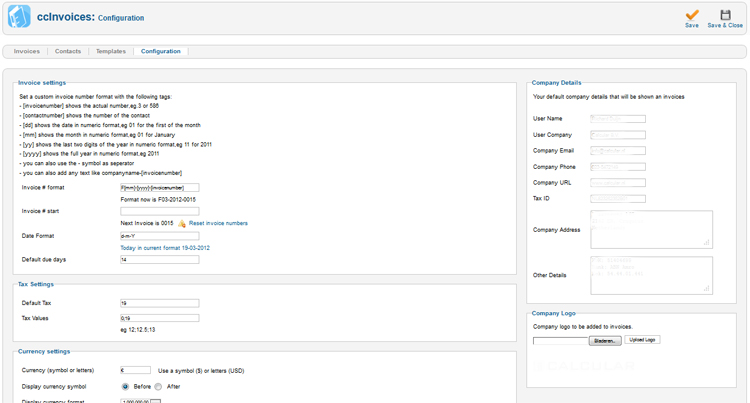
ccInvoices Configuration