
Deprecated: Methods with the same name as their class will not be constructors in a future version of PHP; mwm_aalLoader has a deprecated constructor in /home/cctest/domains/chillcreations.cctestweb.com/public_html/wp-content/plugins/better-anchor-links/auto-anchor-list.php on line 30

Deprecated: Methods with the same name as their class will not be constructors in a future version of PHP; mwm_aal has a deprecated constructor in /home/cctest/domains/chillcreations.cctestweb.com/public_html/wp-content/plugins/better-anchor-links/mwm-aal-class.php on line 14

Notice: Function add_shortcode was called incorrectly. Invalid shortcode name: . Do not use spaces or reserved characters: & / [ ] = Please see Debugging in WordPress for more information. (This message was added in version 4.4.0.) in /home/cctest/domains/chillcreations.cctestweb.com/public_html/wp-includes/functions.php on line 6031

Notice: Trying to access array offset on value of type int in /home/cctest/domains/chillcreations.cctestweb.com/public_html/wp-content/themes/yoo_capture_wp/warp/src/Warp/Config/Repository.php on line 243

Notice: Trying to access array offset on value of type int in /home/cctest/domains/chillcreations.cctestweb.com/public_html/wp-content/themes/yoo_capture_wp/warp/src/Warp/Config/Repository.php on line 243

Notice: Trying to access array offset on value of type int in /home/cctest/domains/chillcreations.cctestweb.com/public_html/wp-content/themes/yoo_capture_wp/warp/src/Warp/Config/Repository.php on line 243

Notice: Trying to access array offset on value of type int in /home/cctest/domains/chillcreations.cctestweb.com/public_html/wp-content/themes/yoo_capture_wp/warp/src/Warp/Config/Repository.php on line 243
How to only allow administrator access to ccInvoices » Chill Creations
Deprecated: Function WC_Cart::get_checkout_url is deprecated since version 2.5! Use wc_get_checkout_url instead. in /home/cctest/domains/chillcreations.cctestweb.com/public_html/wp-includes/functions.php on line 6031

logo

How to only allow administrator access to ccInvoices

You can setup Joomla! ACL so that users in a certain user group can only view and use ccInvoices in the Joomla! administrator, and nothing else. This is an alternative to the need some people have to allow invoice editing in the Joomla! site. Using Joomla! ACL to solve this need is actually exactly what one of the goals of the ACL system is. And as a bonus, it’s pretty easy to setup! 
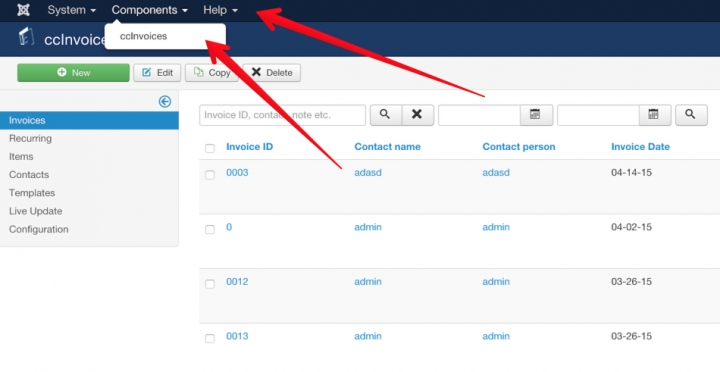
Setting up Joomla! ACL to only show ccInvoices 

Follow these steps to set this up:

  • Login to the Joomla! administrator
  • Users > Groups > Create a new group “ccInvoices” with group parent “Public”
  • Users > Access Levels > Edit “Special,” and add the “ccInvoices” group to the access Level.
  • System > Global Configuration > Permissions > Select “ccInvoices” > set “Admin Login” to Allowed
  • System > Global Configuration > Permissions > ccInvoices > Select “ccInvoices” > Set “Allowed”
    to all actions that you want the user to be able to perform
  • Users > User Manager > Add new User > Create a new user, assign to group “ccInvoices”
  • You could create a direct link on the site to http://www.yourdomain.com/administrator/index.php?option=com_ccinvoices called “Admin” or something similair for example to make it easier for the person that needs ot manage invoices to get access. 

That’s it!