Deprecated: Methods with the same name as their class will not be constructors in a future version of PHP; mwm_aalLoader has a deprecated constructor in /home/cctest/domains/chillcreations.cctestweb.com/public_html/wp-content/plugins/better-anchor-links/auto-anchor-list.php on line 30

Deprecated: Methods with the same name as their class will not be constructors in a future version of PHP; mwm_aal has a deprecated constructor in /home/cctest/domains/chillcreations.cctestweb.com/public_html/wp-content/plugins/better-anchor-links/mwm-aal-class.php on line 14

Notice: Function add_shortcode was called incorrectly. Invalid shortcode name: . Do not use spaces or reserved characters: & / [ ] = Please see Debugging in WordPress for more information. (This message was added in version 4.4.0.) in /home/cctest/domains/chillcreations.cctestweb.com/public_html/wp-includes/functions.php on line 6031

Notice: Trying to access array offset on value of type int in /home/cctest/domains/chillcreations.cctestweb.com/public_html/wp-content/themes/yoo_capture_wp/warp/src/Warp/Config/Repository.php on line 243

Notice: Trying to access array offset on value of type int in /home/cctest/domains/chillcreations.cctestweb.com/public_html/wp-content/themes/yoo_capture_wp/warp/src/Warp/Config/Repository.php on line 243

Notice: Trying to access array offset on value of type int in /home/cctest/domains/chillcreations.cctestweb.com/public_html/wp-content/themes/yoo_capture_wp/warp/src/Warp/Config/Repository.php on line 243

Notice: Trying to access array offset on value of type int in /home/cctest/domains/chillcreations.cctestweb.com/public_html/wp-content/themes/yoo_capture_wp/warp/src/Warp/Config/Repository.php on line 243
How to change reCaptcha in CC Newsletter » Chill Creations
Deprecated: Function WC_Cart::get_checkout_url is deprecated since version 2.5! Use wc_get_checkout_url instead. in /home/cctest/domains/chillcreations.cctestweb.com/public_html/wp-includes/functions.php on line 6031

logo

How to change reCaptcha in CC Newsletter

To add the ReCaptcha  -> EasyCalcCheck Plus – ECC+ integration -> to your website you need to follow the below steps.

For protection form fraud and abuse, stopping bots and other automated attacks :

Follow these steps:

  1. Install and  enable  ECC+
  2. Enable  “Custom call”  in the ECC+ plugin settings (very important!)
  3. You can if you chooses to do so, configure other settings, such as selecting the reCaptcha to use in the subscription form.
  4. Go to Components > ccNewsletter > Configuration.
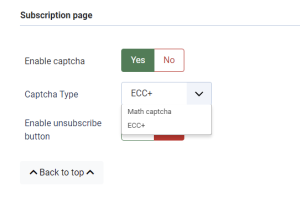
  5. In the Subscription Page section set Enable Captcha to Yes
  6. Choose Captcha Type as ECC+
  7. Proceed then to click on the Save button and submit.
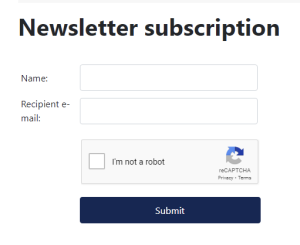
  8. Check the ccNewsletter page or module at the front end of your website to see the changes.