
Deprecated: Methods with the same name as their class will not be constructors in a future version of PHP; mwm_aalLoader has a deprecated constructor in /home/cctest/domains/chillcreations.cctestweb.com/public_html/wp-content/plugins/better-anchor-links/auto-anchor-list.php on line 30

Deprecated: Methods with the same name as their class will not be constructors in a future version of PHP; mwm_aal has a deprecated constructor in /home/cctest/domains/chillcreations.cctestweb.com/public_html/wp-content/plugins/better-anchor-links/mwm-aal-class.php on line 14

Notice: Function add_shortcode was called incorrectly. Invalid shortcode name: . Do not use spaces or reserved characters: & / [ ] = Please see Debugging in WordPress for more information. (This message was added in version 4.4.0.) in /home/cctest/domains/chillcreations.cctestweb.com/public_html/wp-includes/functions.php on line 6031

Notice: Trying to access array offset on value of type int in /home/cctest/domains/chillcreations.cctestweb.com/public_html/wp-content/themes/yoo_capture_wp/warp/src/Warp/Config/Repository.php on line 243

Notice: Trying to access array offset on value of type int in /home/cctest/domains/chillcreations.cctestweb.com/public_html/wp-content/themes/yoo_capture_wp/warp/src/Warp/Config/Repository.php on line 243

Notice: Trying to access array offset on value of type int in /home/cctest/domains/chillcreations.cctestweb.com/public_html/wp-content/themes/yoo_capture_wp/warp/src/Warp/Config/Repository.php on line 243

Notice: Trying to access array offset on value of type int in /home/cctest/domains/chillcreations.cctestweb.com/public_html/wp-content/themes/yoo_capture_wp/warp/src/Warp/Config/Repository.php on line 243
Showing a newsletter archive on the site » Chill Creations
Deprecated: Function WC_Cart::get_checkout_url is deprecated since version 2.5! Use wc_get_checkout_url instead. in /home/cctest/domains/chillcreations.cctestweb.com/public_html/wp-includes/functions.php on line 6031

logo

Showing a newsletter archive on the site

To show your newsletter archive on the front-end of your website you just have to follow these steps here below.

Showing a newsletter archive using a menu item
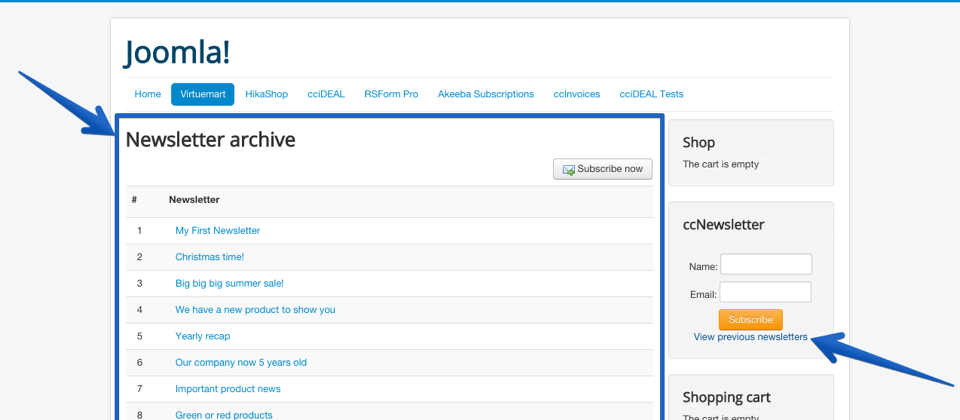
Joomla! newsletter archive

  1. Go to the administrator of the Joomla! website
  2. Once you are logged in, go to Menus > Main Menu (or in any other menu you want to use this)
  3. Click on the “New” button on the top right place of your screen to add a new menu item
  4. Click on the select button, next to the field “Menu Item Type”, and choose “Archive” under the ccNewsletter section
  5. Fill in the “Menu Title” and if you use more of this items in other menus please also type on each menu item a different “Alias” to avoid difficulties
  6. When your done with configuring the menu item, please click on the “Save & Close” button on the top right place of your screen to save your menu item.
  7. You can now check the menu item on the front-end of your website


How to be sure your newsletter is added to the archive
You need to enable every newsletter you want to show in the archive, as they are not shown by default. You can enable the newsletter in the newsletter edit view (select “Yes” on “Show Site” in the Details section) or in the newsletter overview (click the disable icon to toggle to enable).